The Settings page
Snape 2.0Version 1.0 · 6 November 2026KC-02-045
This guide is for Snape 2.0. Other versions: Snape 1.0.
Gateway Settings
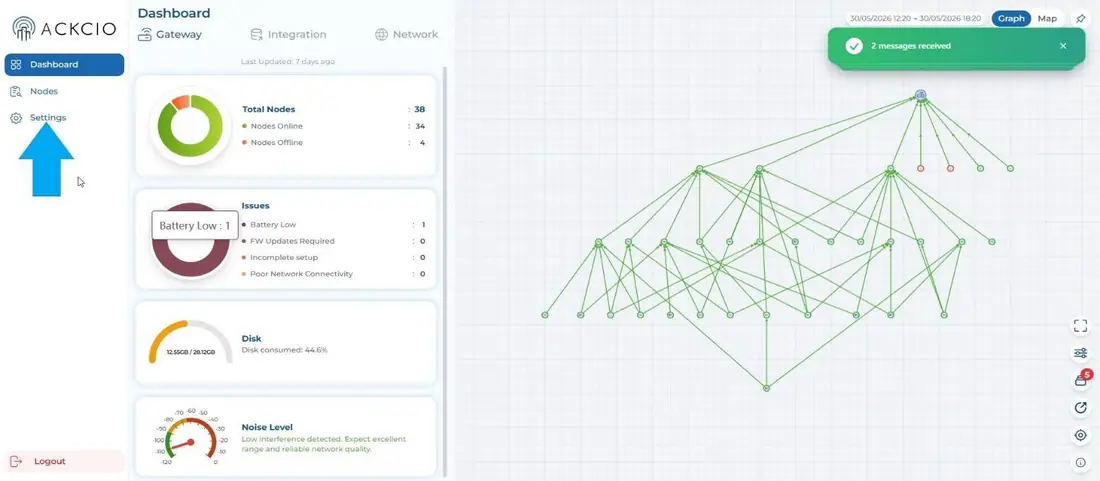
Once you login to the Gateway, you will be welcomed with the landing page. You can navigate to the settings page by clicking the gear icon in the left corner as marked in blue arrow. The Settings page allows you to configure various Gateway settings.
What each tile does
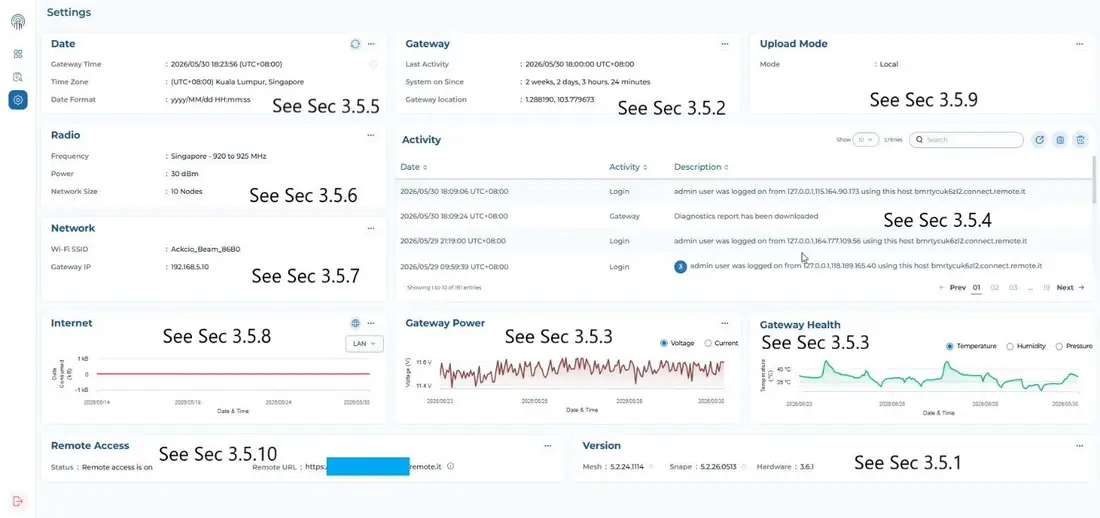
Click a tile on the Settings page below to open its guide.
 Date & NTPRestart & restoreData uploadRadioActivity & logsWi-Fi networkInternetPowerHealthRemote accessUpdates
- Date → Date & NTP
- Gateway → Export/import, location, restart or restore
- Upload Mode → Data upload (API & FTP)
- Radio → Radio settings
- Activity → Gateway health, activity & logs
- Network → Gateway Wi-Fi network settings
- Internet → Internet settings
- Gateway Power → Gateway health, activity & logs
- Gateway Health → Gateway health, activity & logs
- Remote Access → Remote access (remote.it)
- Version → Updating Snape & Mesh