Shut down, restart or restore the gateway
Shutdown, Restart or Restore your gateway
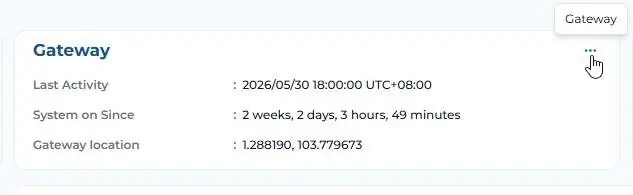
The “Gateway” panel allows users to safely shutdown, restart, or restore your gateway and its software to factory settings together with importing/exporting config files which can be ported over to different Gateway. Click on the three dots in the “Gateway” panel of your gateway and select one of the following actions:
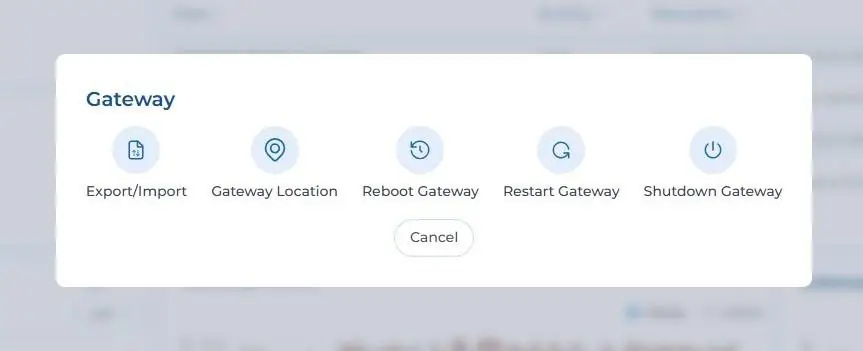
Export/Import
This feature allows you to export the entire configuration files from a working GW and load it into a new GW and nodes would start communicating to the new GW without needing any form of recommissioning. Kindly take note that FTP/API has to be reconfigured including remote.it as the GW ID would have changed from an old one to a new ID.
Gateway Location
This allows you to assign a location to the GW either via pick and drop option on the map or assigning coordinates manually.
Restore Gateway
This restores your gateway to its factory settings and deletes all of the settings, data, and project information stored on the gateway. Ensure that you have backed-up your data before restoring gateway to factory settings
Restart/Reboot Gateway
This safely restarts or reboots your gateway. Any unsaved changes would be lost and you will lose connection to your gateway. It will take 1-2 minutes before you can reconnect and get access.
Shutdown Gateway
This safely shuts down your gateway. Any unsaved changes would be lost and you will permanently lose connection to your gateway. Take care when triggering it remotely and you do not have physical access to your gateway.