Connecting GeoArray to a BEAM-DG
Snape 1.0, Snape 2.0 and StandaloneVersion 1.1 · 6 November 2026KC-04-011
GeoArray connects to the Ackcio Digital Node (BEAM-DG) over RS485 and is commissioned with the Ackcio Nimbus app like any other DG sensor.
Kit check
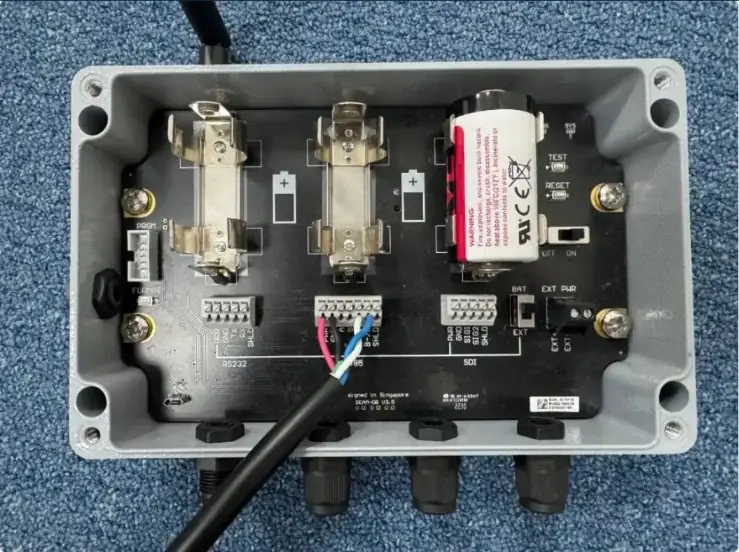
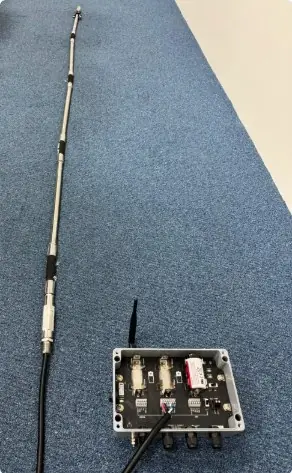
The images below show the full sensor kit alongside the Ackcio node. Before wiring, ensure all sensors are accounted for and cables are undamaged.
Wiring
- Connect each sensor to the corresponding channel.
- Ensure the 3.6V ER34615 D-Cell battery is inserted before closing the enclosure.
For the DG terminal layout and firmware steps, see BEAM-DG digital node.
Commissioning walkthrough
Follow the video for your installation type to commission the node through Snape and verify sensor data is transmitting correctly.
 Commissioning videoGeoArray (vertical): commissioningWatch on YouTube ↗Commissioning videoGeoArray (horizontal): commissioningWatch on YouTube ↗
Did you know?If you install vertically, enter the measured angle offset in Nimbus during commissioning. See step 8 of Vertical installation.