Gateway overview and LEDs
The Ackcio Gateway is the key point of data collection and transmission for your project. Ackcio’s Snape software comes installed on every gateway and allows you to configure your gateway to meet the unique requirements of each deployment. Your gateway is equipped for internet access over its integrated 3G/4G antenna, ethernet connection to router, or through Wi-Fi on 2.4GHz. This allows your gateway to connect to the API or FTP server of your choice (see Data upload (API & FTP)).
Did you know?Your gateway can connect with up to 50 nodes, providing a network robust enough to handle all of your data.
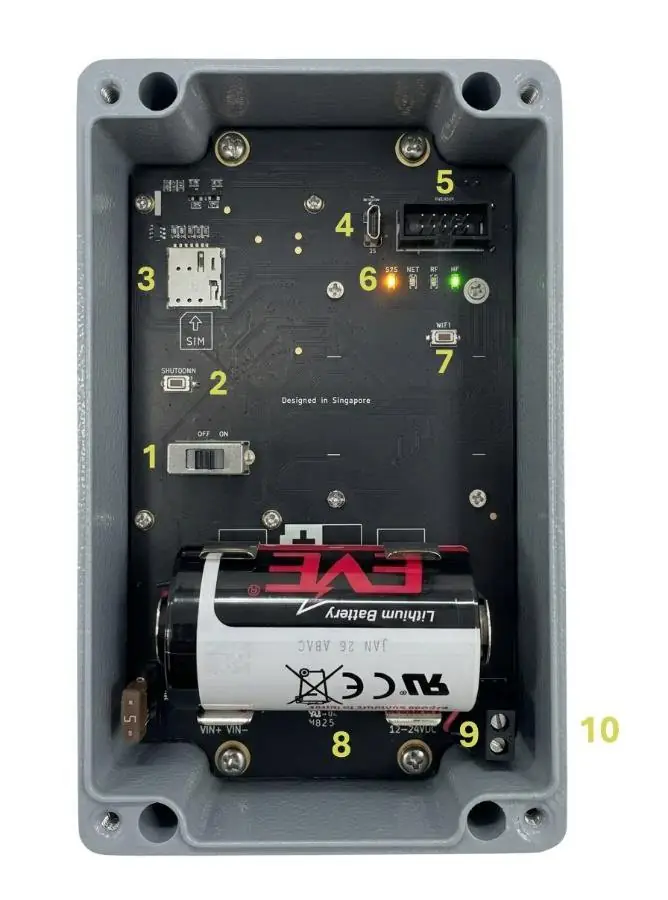 12345678910
Inside the Ackcio Gateway. The numbers match the list below.
- 1On/Off Switch.
- 2Shutdown button is used to power down the device safely.
- 3SIM card (only nano-sim) tray for providing internet over cellular connection.
- 4Micro USB port
- 5Debugger port which can be used for troubleshooting and applying firmware updates.
- 6SYS, NET, RF, WF LEDs. See Gateway LED Behaviour below for more information.
- 7Wi-Fi button which can be used to turn gateway’s Wi-Fi network on and off by holding for more than 5 seconds.
- 8Battery holder provide backup power in case main power is lost.
NoticeWe have disabled this feature on GW 3.6. This feature is still applicable on older GW HW Versions 3.5 and older, and upcoming GW HW 3.7.
- 9External power supply input for 12V 3A power supplies.
- 10LAN port to connect to GW locally or to provide internet via router
Notice · BEAM-TM-LBEAM-TM-L nodes need GW 3.6.1, which adds a LoRa antenna port on the left. See BEAM-TM-L & GW 3.6.1.
Gateway LED Behaviour
The LED lights inside the gateway are used to indicate the status of the gateway. See below for an explanation of each light.
- SYS LEDDuring normal operation, the SYS LED will blink in an alternating pattern with the RF LED
- NET LEDThis light indicates that the gateway is trying to access the internet through its cellular connection
- RF LEDDuring normal operation, the RF LED will blink in an alternating pattern with the SYS LED
- WF LEDThis light indicates that the WiFi network created by the gateway is available. After turning the gateway on, this light should become solid within 60-90 seconds.