FAQ: Gateway set-up and operation
Q22What is the power supply specification for the Gateway?
The Gateway requires a continuous 12 V, 3 A DC supply (minimum 36 W) for stable operation. Frequent reboots due to unstable power can corrupt the Snape software and Flash memory.
Q23Can I use an externally sourced power adapter?
Yes, provided it meets all of the following:
- Output voltage: 12 V DC
- Output current: 3 A or higher
- Power rating: At least 36 W
Q24What is the maximum input voltage the Gateway can tolerate?
The Gateway is rated to handle up to 24 V, with 16 V as the maximum recommended operating voltage (minimum 3 A).
Q25Can the Gateway operate without mains power?
No. During a power outage, nodes store readings in their onboard 8 MB Flash Memory and sync back to the Gateway once power is restored.
Q26What happens if the Gateway loses power for an extended period?
Nodes enter deep sleep mode and attempt reconnection in 6-hour cycles, a deliberate design to conserve battery life during prolonged outages.
Q27Can Ackcio devices be relocated after deployment?
Ackcio devices are engineered for static deployment. Reliable, consistent readings are only guaranteed when both nodes and Gateway remain fixed in position.
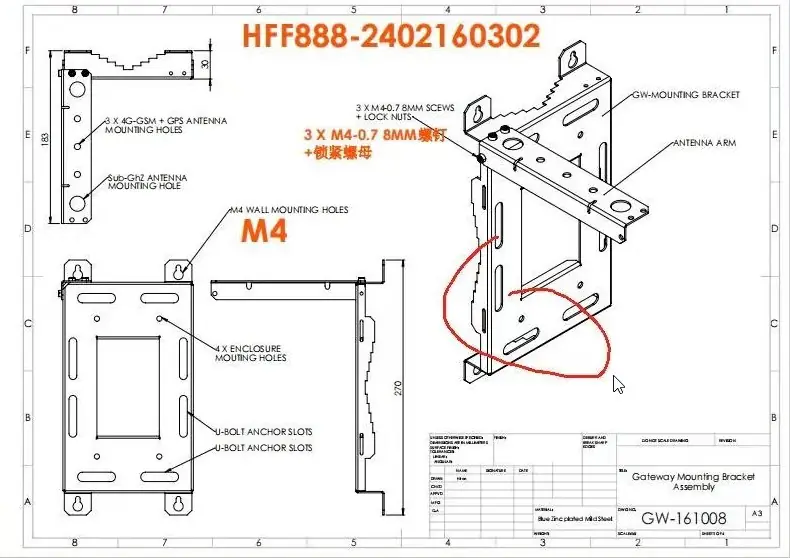
Q28What is the Gateway's pole mounting requirement?
The Gateway U-bracket accommodates poles up to 7.8 cm in diameter. Allow adequate clearance at both bracket ends.
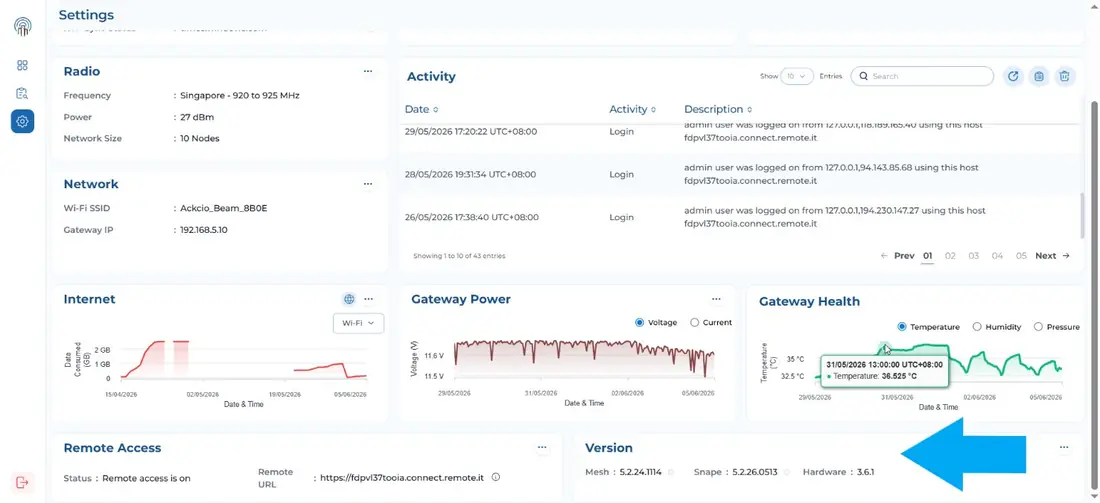
Q29How do I identify the Gateway hardware version, Snape, and Mesh firmware version?
Navigate to Settings in Snape and refer to the Version tile.
Q30How do I determine the year of manufacture from the hardware version?
- < Q3 2022 → HW v3.0 & 3.1 (Manufactured in China)
- Q4 2022 → HW v3.5 (OSIE Singapore)
- Q4 2023 → HW v3.6 (OSIE Singapore, enhanced radio chip)
- Q1 2025 → GW 3.6 commercial launch
Q31What are the key improvements in Gateway HW 3.6 over 3.5?
- LAN speed upgraded to 1 Gbps (vs. 10/100 Mbps on 3.5)
- External Wi-Fi antenna for extended wireless range
- Remote.it pre-configured out of the box
- Enhanced radio chip for stronger mesh performance
- Unique MAC addresses: no LAN conflict when deploying multiple units
Q32What is the LAN conflict issue on Gateway HW 3.5, and how is it resolved?
All HW 3.5 units share an identical MAC address and default IP (169.254.161.241), causing conflicts when multiple units connect to the same LAN.
Workaround: Replace the default Ethernet adapter on each GW with a unique third-party USB adapter.
Fully resolved in GW HW 3.6: no workaround needed.
Q33Can Gateway HW 3.5 work with private SIM cards (e.g., HELLA for mining)?
No. GW HW 3.5 and older support standard retail SIM cards only. Private SIM cards require GW HW 3.6.
Q34What should be verified during initial Gateway and node deployment?
- Placement: Perform Network and Noise Tests; confirm healthy RSSI on at least 2 neighbouring nodes.
- Battery health: All nodes online; battery > 3.0 V.
- Gateway power: Stable 12 V, 3 A DC confirmed.
- Data integrity: No sensor readings routed to the error folder.
The Ackcio Mesh automatically manages ETX and RSSI, no manual adjustment needed.
Q35What is the ideal site survey checklist before deploying an Ackcio system?
Before deployment, confirm the following site conditions:
- Assess RF environment: identify potential sources of EMI or RFI near sensor locations.
- Verify power availability: confirm 12 V / 3 A DC can be reliably supplied to the Gateway location.
- Check internet connectivity: test LAN, Wi-Fi, or cellular signal at the Gateway mounting point.
- Evaluate mounting locations: ensure all nodes and the Gateway can be fixed to stable, elevated structures.
- Confirm IP rating adequacy: for harsh environments, plan for additional enclosure protection.