Sync node settings with your gateway
Syncing your Node settings with your Gateway
Once you’ve finished commissioning all your Nodes, you will need to sync their settings with your Gateway via the Ackcio Nimbus application. This is important as it is required for the Gateway to properly process the data from your sensors:
1. Connect your Android device to the Gateway's Wi-Fi network or remote.it link
2. Enter the Setup Project page on your Ackcio Nimbus application.
3. Tap the Project Sync button to sync all your Nodes' configuration settings on the Gateway only if the Nimbus App is not connected to GW Wifi Hotspot or Remote.it link otherwise Sync is done automatically provided mobile has Internet or connected to GW Wifi hotspot.
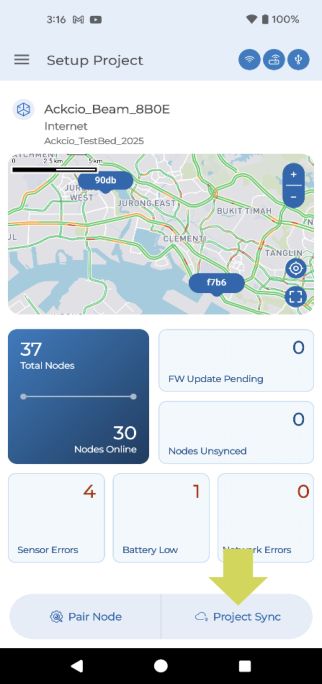
4. Your Nodes will then be fully commissioned and start sending data to your Gateway in 5- 10 minutes.
5. Once the Node has successfully joined the network, you will see the SYS LED stop blinking. The Node will then start taking readings and sending that data to the Gateway at the scheduled sampling intervals.
Did you know?While our recommended method of connecting to the Gateway to perform the Project Sync is via the Gateway’s Wi-Fi, it is also possible to connect to the Gateway via remote methods such as RemoteIT link or public IP addresses.
CautionDo take note that there is a maximum of 50 Nodes per Gateway, and that any Nodes commissioned past that limit will not be able to connect to the Gateway. This is important as those Nodes will start to drain their battery by constantly attempting to join the network.
CautionYou should always deploy your Nodes where they are able to communicate with the Gateway, whether it is directly or through other Nodes in the network. If you deploy your Nodes without a connection to the Gateway, they will drain their battery faster and potentially become unusable once their battery has completely drained.